
Vulnerability alerts · 8 min read
Critical PHP flaws CVE-2026-109618 and CVE-2026-109619: is your app affected?

On 21 October 2026, the PHP project released emergency fixes for two critical vulnerabilities, both rated 9.2 on the CVSS v4.0 scale. An attacker who isn’t logged in can use them to run code on your server. If your app runs on PHP — Laravel, WordPress, Symfony or plain PHP — you need to update. And if, like me, you can’t update yet, you need to protect your server in the meantime.
The short version
- Affected: every PHP installation that serves web requests (PHP-FPM, Apache with mod_php, php-cgi, FrankenPHP, LiteSpeed).
- Fixed in: PHP 8.5.12, 8.4.27, 8.3.36 and 8.2.35.
- Highest risk: Apache with mod_php, where the PHP team says a working exploit triggers before any of your code runs.
- The fix: update PHP on the server and restart it. Your application code doesn’t change.
- Patch not available yet? Apply the temporary settings below, then update as soon as you can.
What the two flaws are
CVE-2026-109618 abuses the way PHP handles running out of memory. If memory runs out at the wrong moment, PHP can be left holding half-built request data, then treat it as valid during cleanup.
CVE-2026-109619 abuses state that outlives its request. A piece of internal data can survive after its memory has been freed, and the next request handled by the same worker may use it.
In both cases the attacker only needs to send requests to your site. No account, no password, no bug in your own code.
Is your app affected?
Check the PHP version your web server actually uses — not just the one on the command line, which can differ.
- On the server, run
ls /etc/php/(Debian, Ubuntu) to list every installed version, thenphp8.3 -vfor each one. - In a hosting panel (cPanel, Plesk, Hestia, Forge, Ploi), open each site’s PHP settings and note the version.
- In Docker, run
docker run --rm your-image php -v.
You’re safe on a given site only if it shows 8.5.12, 8.4.27, 8.3.36, 8.2.35 or later in the same branch. Anything older, including PHP 8.1, 8.0 and 7.x, is vulnerable.
What happened on my own server
I run several client and personal sites on an Ubuntu 24.04 server managed with Hestia, using the popular community PHP repository. The server was on PHP 8.5.10. I got my host’s warning email, checked php.net, and ran the update.
It failed. The repository answered 503 Service Unavailable on almost every package, the download crawled along at a few kilobytes per second, and after several minutes apt gave up. Even the package index wouldn’t refresh, so apt was still offering the previous version, not the patched one. The repository was clearly overloaded.
I wasn’t the only one stuck. A little later I opened NameSilo to update a domain and found the whole registrar offline: their notice explained that they had taken the platform down as a precaution while waiting for the PHP patches, and that pulling from the repositories was taking longer than planned. If a domain registrar prefers to switch off rather than run unpatched for a few hours, that tells you how seriously to take this.
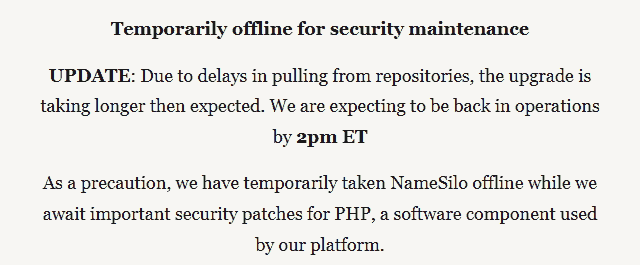
I didn’t want to take my sites offline, so I applied the PHP team’s temporary measures and kept retrying the update.
How to update
- Take a snapshot or backup of the server first.
- Update PHP through your package manager or panel. On Ubuntu or Debian:
apt update && apt list --upgradable | grep php. If the patched version is listed, runapt upgrade. Ifapt updateshows errors for the PHP repository, the index is stale and the patch isn’t there for you yet: retry later. - Restart PHP and the web server, for example
systemctl restart php8.5-fpmthen Apache or Nginx. Until you restart, the old, vulnerable code keeps running. - Check again with
php -vand in each site’s settings. - In Docker, pull the updated PHP base image, rebuild your image and redeploy. Rebuilding without pulling may reuse the old base.
- On managed hosting, check your host’s status page or ask support whether the patched version is live on your plan.
What to do while you wait for the patch
The PHP advisory lists settings that block the known attack paths. They reduce the risk; they don’t remove it. Here is what I applied on my server, for PHP-FPM 8.5. I put the settings in their own file so they’re easy to find and remove later:
cat > /etc/php/8.5/fpm/conf.d/99-cve-2026-mitigation.ini <<'EOF'
session.upload_progress.enabled = 0
post_max_size = 8M
EOF
systemctl restart php8.5-fpm
php-fpm8.5 -i | grep -E "upload_progress.enabled|post_max_size"
The last command should show Off and 8M. A few points matter:
- Do it for every PHP version that serves sites (
/etc/php/8.3/fpm/,/etc/php/8.4/fpm/…), and restart each FPM service. Workers that aren’t restarted keep the old settings. - Check that nothing overrides it. Panels can set their own values per site. Run
grep -rE "post_max_size|upload_progress" /etc/php/*/fpm/pool.d/: if a pool sets a higherpost_max_size, change it there too. - Don’t rely on
ini_set(),.htaccessor.user.ini. The advisory is clear: the settings must apply before PHP reads the request. - On PHP 8.5, also consider
fatal_error_backtraces = 0, which blocks another confirmed path.
The advisory also mentions memory_limit = -1 against the first flaw. I didn’t apply it: it removes PHP’s memory cap, so a single runaway script can eat all the server’s RAM and take every site down with it. On a shared server with several sites, I preferred the smaller risk.
The side effects, especially on WordPress
post_max_size is the maximum size of everything a browser sends in one request: form fields and uploaded files together. At 8 MB, anything bigger is refused. In practice:
- WordPress media uploads above about 8 MB fail. Large photos, PDFs and especially videos. The error is often confusing, such as “The link you followed has expired”, because PHP silently drops the whole request.
- Uploading a theme or plugin as a zip fails if the zip is over the limit. Install it with WP-CLI or by uploading the files directly instead.
- Imports break: WordPress XML imports, WooCommerce product CSVs, backup restores from plugins that upload an archive.
- Page builders can fail to save very large pages, because the whole page is sent in one request.
- Laravel and other apps: any form with file uploads, avatars, document uploads or large JSON payloads above 8 MB get rejected before your code even runs. Check your logs for
PostTooLargeException. - Keep
upload_max_filesizelower thanpost_max_size, otherwise your app will claim it accepts files that PHP will actually refuse.
If your sites really need uploads, the advisory suggests 32 MB instead of 8 MB. It’s a compromise: a bit more exposure, fewer broken features.
Turning off session.upload_progress has almost no visible effect. It only matters for the rare apps that show an upload progress bar using PHP sessions; most modern upload widgets track progress in the browser.
After the patch: undo the workaround
- Update PHP, restart FPM and check the version.
- Delete the mitigation file (
rm /etc/php/8.5/fpm/conf.d/99-cve-2026-mitigation.ini) and restart FPM again, so your uploads work normally. - Test a media upload on each WordPress site.
Still on PHP 8.1 or older?
The PHP project no longer ships releases for these versions. Some distributions backport the fix, and the PHP security team published minimal source patches for 7.4, 8.0 and 8.1 for people who build PHP themselves. The safer move is to switch the site to PHP 8.3 or newer. Note that PHP 8.2 also reaches end of life on 31 December 2026, so plan that upgrade now.
What this means for your code
This one is a server problem, not a code problem: no change to your Laravel or WordPress code will fix it, and no code audit replaces the update. What a code audit does catch is everything an attacker can reach once they’re in — secrets in config files, admin routes without checks, database access that’s wider than it should be. A server compromise hurts far less when the app behind it is clean.
Patched your server? Run the free scan on your live URL to check what it exposes from the outside, then see what a code audit finds on the inside.